
How To Make And Use A DIY Bluetooth Speaker
What’s In This Page
PAGE UPDATE IN PROGRESS
Instructions on how to make and use a DIY Bluetooth Speaker that is small enough to be used in a train layout scene or diorama base.
It also contains a video demonstration.
If you are using a phone, at the bottom of the page there are links to many supplies for modelers. Otherwise those links are in the sidebar to the right. You can also find other information by using the search function that is in the navigation bar above.
The Latest Information
Anything new and page updates are posted on X (formerly Twitter), Rumble and Facebook.
It is easy to keep up with the latest by following us on either of them.
Free Help
The Audio Receiver Module
 When working with audio, you are transferring audio. You must use an audio transciever module and not an Hc-05 data receiver.
An HC-05 is a receiver but it receives only data. It does not receive audio. A Bluetooth audio module must be use to either transfer or receive audio.
You pair audio transceiver modules two modules. Pairing is permanent. And audio will only pass between these two.
Why A DIY Bluetooth Speaker.
A DIY speaker can be small and as such able to be hidden in a strategic place under a layout, Christmas village, other scene or at a removed location. That is not the case with commercial speakers that are large and don’t lend themselves to easily being hidden.
These speakers are placed away from the sound generating player. You can have a player in your scene and the sound elsewhere, or the speaker in your scene and the player elsewhere, such as in a control panel.
 The image to the left shows a speaker, 5 v amplifier and Bluetooth receiver. It is small and easily concealed.
All it needs is a power connection to be ready to broadcast audio. I use speakers such as these placed around my layout to play different sounds – all chosen at my sound control panel.
How To Wire The DIY Bluetooth Speaker
The setup is simple. This speaker is 4 ohm, 2 watt. It has two leads.
Connect either one to Audio L and the other to Audio R on a Bluetooth Audio Receiver module.
The module +5v and Grnd pins are connected where is best for where you want to locate the speaker.
Speaker Location
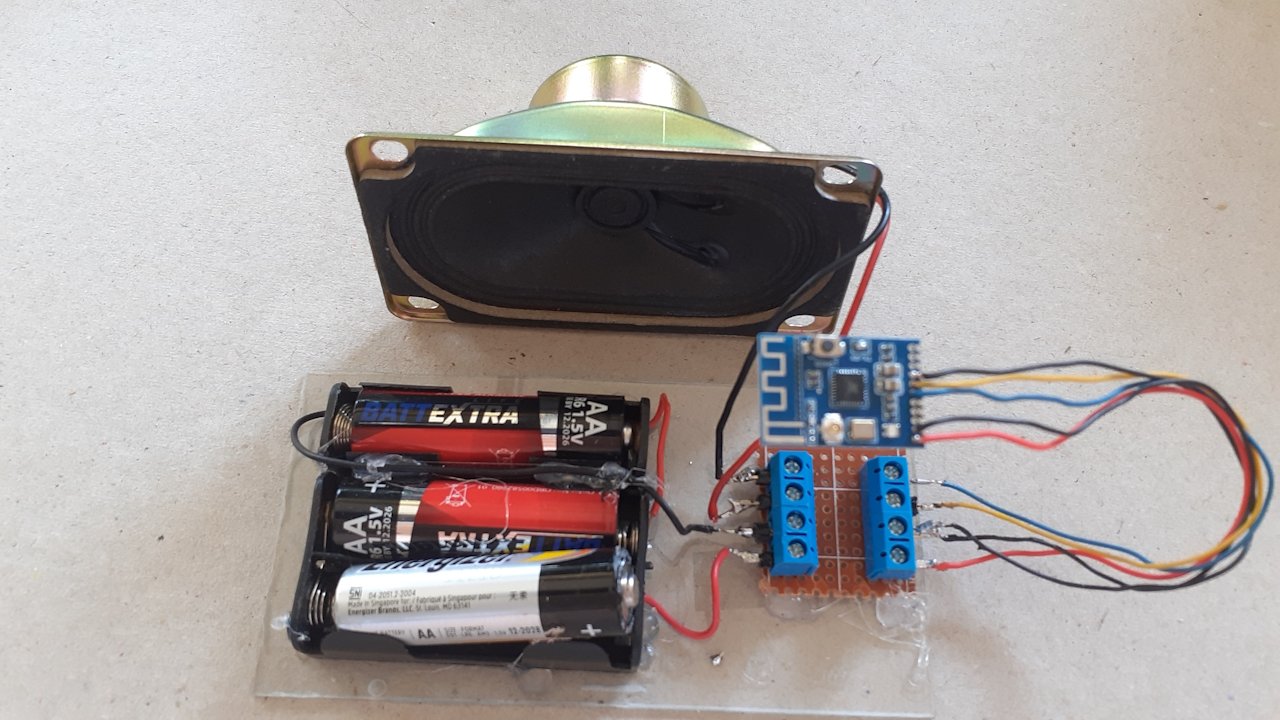 The image to the left shows a battery powered speaker. It is location independent.
The power is provided by three 1.5 volt batteries wired in series. It will a switch will be added and finally the assembly will be put in a box.
It is shown without the switch and box so that you can easily see how easy it is to make.
To hide it under your scenery (or whatever), instead of using battery power, connect it to a 5 volt power source.
Amplification
Video Image The audio in this video gives you a feel for audio level.
For areas with a high background noise, you will probably want to amplify the audio.
The image to the left shows how a speaker is connected to a 5 volt amplifier.
As a further modification, to control volume, insert a 10k potentiometer
How To Play The Audio
The Audio Receiver Module must be paired with the Audio Transmitter Module that is connected to the MP3 player.
Power up both. Press the button, at the same time, on each module. Once paired, pairing is permanent. Henceforth audio will be heard on the speaker when both are powered up. Watch this video demo.
Audio will be broadcast
Free Help